Guide to Connecting to an Iranian IP on Windows via Cisco

Note:

vpn iran is intended for Iranians living abroad and is not a censorship-bypass tool. This service is guaranteed to provide access to mobile banking, internet banking, websites, applications, and all Iranian systems from outside the country.

vpn iran Accessible on All Devices

Financial accounts have access to banks and all other websites. They also open all Iranian websites and payment gateways.

Non-financial accounts do not have access to banks. However, they can open all Iranian websites.

Payment is available via cryptocurrency, Shaparak, card-to-card transfer, Visa, and MasterCard.

Financial Account Pricing

180،000 IRT
500،000 IRT
900،000 IRT
1،600،000 IRT

Non-Financial Account Pricing

55،000 IRT
145،000 IRT
285،000 IRT
495،000 IRT

1. Download the AnyConnect application for Iran VPN. (Click here to download)

2. Open and install the file Cisco-AnyConnect_VPN-IRAN.COM.msi.

3.After installation, open Cisco AnyConnect Secure Mobility Client from your Windows programs list.
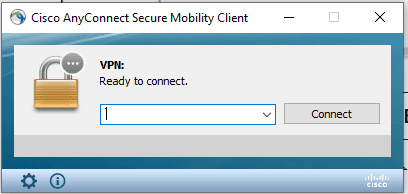
4. Click the gear icon in the bottom-right corner of the application to open Settings, then uncheck the option Block connections to untrusted servers.

کانکشن سیسکو برای ویندوز

Unchecking Block connections to untrusted servers

5. Enter the Cisco AnyConnect server address based on your account type:

Non-financial server address: 78.157.57.69

Financial server address: 78.157.57.88

Then click Connect.

اتصال سیسکو برای ویندوز

6. You will receive a VPN connection warning. Click Connect Anyway.

کانکشن سیسکو برای ویندوز

7. After the connection starts, if you see another warning, click Connect Anyway again.
In the next steps, enter the username and password that were emailed to you.

8. If you encounter any errors, please use the other available methods for connecting to an Iran IP for users outside the country, which are listed in the Tutorials section.


Guide to Connecting to an Iranian IP on Windows via Cisco

Leave a Reply

Your email address will not be published. Required fields are marked *

VPN Server Uptime Status

نام سرور وضعیت 24ساعت 7روز 30روز 365روز
سرور اپن وی پی ان - غیر مالی s2.vpn-iran.com ✅ آنلاین 100.000% 100.000% 85.022% 93.226%
سرور اپن وی پی ان - غیر مالی s1.vpn-iran.com ✅ آنلاین 100.000% 99.899% 86.399% 93.269%
سرور اپن وی پی ان - مالی sbank.vpn-iran.com ✅ آنلاین 100.000% 99.899% 78.613% 92.550%
سرور سیسکو - غیر مالی s3.vpn-iran.com ✅ آنلاین 100.000% 100.000% 86.322% 93.245%
سرور سیسکو - مالی sbank2.vpn-iran.com ✅ آنلاین 99.646% 99.796% 86.430% 93.954%
وب سایت vpn-iran.com ✅ آنلاین 100.000% 100.000% 100.000% 99.514%
پنل کاربری new-panel.vpn-iran.com ✅ آنلاین 100.000% 100.000% 99.809% 99.433%